
AI Switcher
AI Switcher combines the aisw CLI and a cross-platform desktop app to manage Claude Code, Codex CLI, Gemini CLI and Antigravity CLI accounts locally.
AI Switcher is the open-source project I built for a recurring problem: moving between work, personal and client accounts across several AI coding agents. It brings together aisw, the command-line tool, and AI Switcher Desktop, its companion graphical app for macOS, Windows and Linux.
The two interfaces share an account model. You can use the terminal for a quick switch or a script, then open the desktop app to inspect the same profiles and repository rules. Supported agents are Claude Code, Codex CLI, Gemini CLI and Antigravity CLI.
Why I built it#
A repository can belong to a client while the coding agent is still signed into a personal account. A second tool can be using a different identity again. Logging out and back in, moving configuration files and remembering which account is active adds friction every time the work changes.
AI Switcher gives that state a name. Save an account once, switch deliberately and check what each tool is actually using. The goal is to make account selection part of the development workflow rather than something reconstructed from hidden files.
The aisw CLI#
aisw is a Rust CLI for saving accounts and activating them locally. A profile identifies one account for one agent, such as a work Claude Code login or a personal Codex CLI account. Profiles can come from an existing login, a provider’s own OAuth flow or a supported API-key configuration.
A context groups profiles from different agents into one setup. For example, a client context can select the right Claude Code, Codex CLI and Gemini CLI profiles even when their individual names differ. Activating that context switches the setup together.
The documentation covers installation, profiles and everyday commands. A Homebrew setup starts with:
brew install burakdede/tap/aisw
aisw init
aisw list
The quickstart walks through saving and switching your first accounts. The download page also provides other installation options and platform binaries.
The desktop app#
AI Switcher Desktop puts the same workflow in a window. It bundles a pinned aisw runtime rather than implementing a separate account switcher.
The interface shows active accounts and whether the live state matches the saved profile. You can manage profiles, activate a complete saved set, inspect repository bindings, diagnose mismatches and review local backups. A set is the desktop name for a CLI context, so there is one shared mapping behind both interfaces.

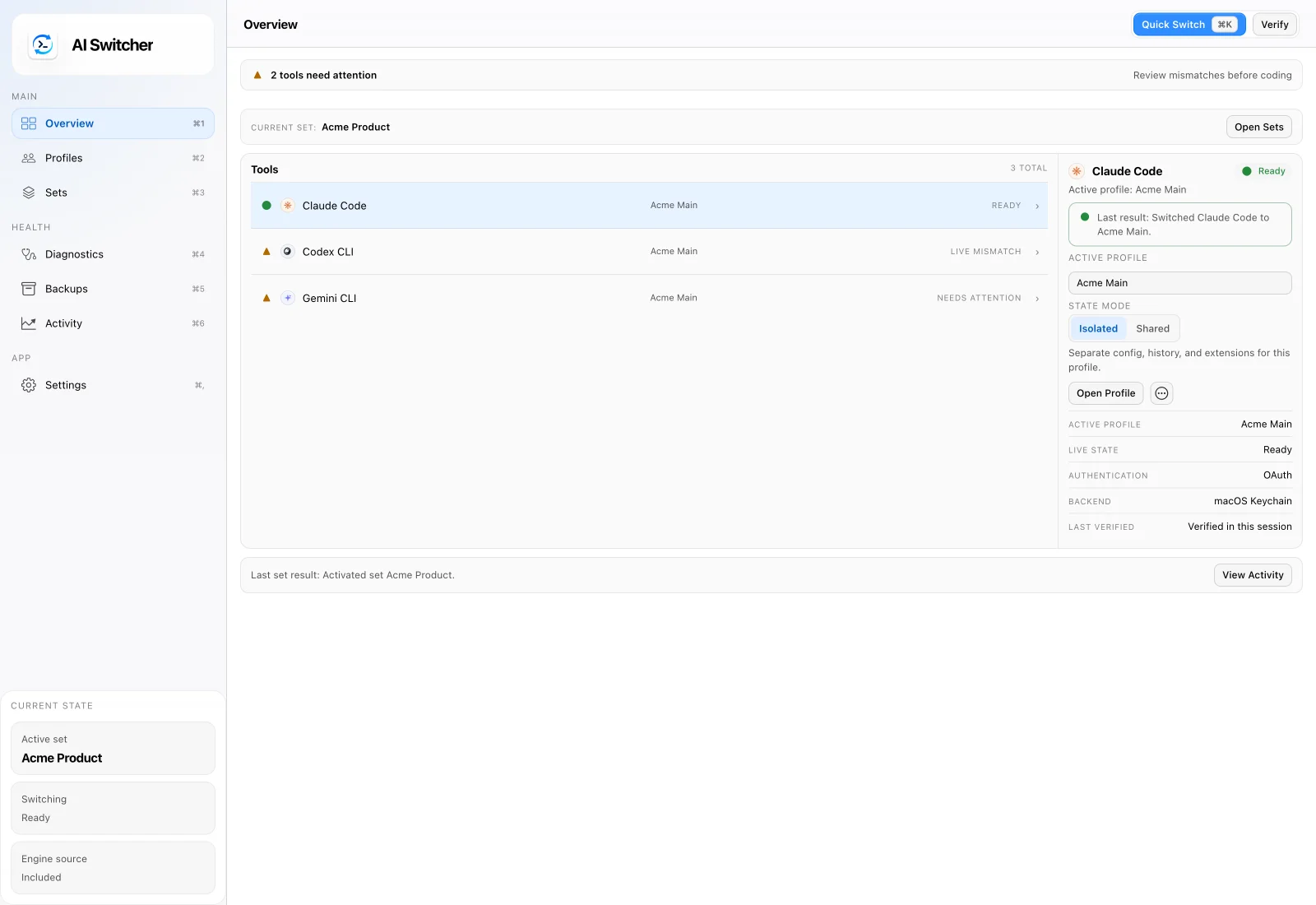
Quick Switch offers a keyboard-driven way to find and activate a profile or set. The app also exposes diagnostics and explicit repair actions when a tool’s live state differs from the expected setup. It is currently a public alpha; the desktop downloads list macOS, Windows x64 and Linux x64 packages.
Connect the account to the repository#
Profiles answer “which account?” Contexts answer “which combination of accounts?” Workspace rules connect that choice to the code you are opening.
You can bind a directory or a Git remote pattern to a context. That makes a client repository or an organization’s repositories resolve to the expected setup. Workspace guardrails can warn about a mismatch or block a guarded launch until the expected context is active. The workspace documentation explains how to configure the shell integration and guard mode for your workflow.
The desktop app surfaces these bindings and mismatches visually. The VS Code and Cursor extension is another small interface to the installed CLI, useful when the editor is where you want to switch accounts.
Local credentials and recoverable changes#
Switching accounts changes credential state, so the storage boundary matters. AI Switcher works with the credential files and operating-system keyrings the upstream tools already use. It does not add an AI Switcher cloud account, credential-sync service or model-traffic proxy.
Switches create local restore points, and failed writes can roll back. Diagnostics help distinguish a saved profile from what a tool is using now. The security model describes storage, native keyrings and restricted local files; check it alongside the supported-tools matrix for your platform.
Explore the project#
Start with aiswitcher.dev, install the CLI or download the desktop app. Both are open source: the aisw repository contains the CLI, and aisw-desktop contains the graphical app.
I have written about the original account-switching problem, the first CLI release, building the desktop companion and bringing the workflow into VS Code and Cursor. Those essays explain the decisions behind the project; the official site and documentation track its current capabilities.